November 24, 2026 · Guides
Gold Loan Software for Nidhi Companies: What It Should Do

If your Nidhi company gives gold loans, the loan is to a member, so the gold record must connect to the member record, the deposits and the ledger. A stand-alone gold register creates double entry and mismatches.
Nidhi Rules on loans are specific, so please verify them with your CA or CS. Here is what the software should handle.
In this guide
- Link to the member
- Ornament and valuation record
- Interest, renewal and release
- Overdue and accounts
- FAQs
Link to the member
The loan must sit on the member record.
- Show member KYC, shares and other loans on the same screen.
- Prevent a loan to a non-member.
- Show total exposure to the member across all loans.
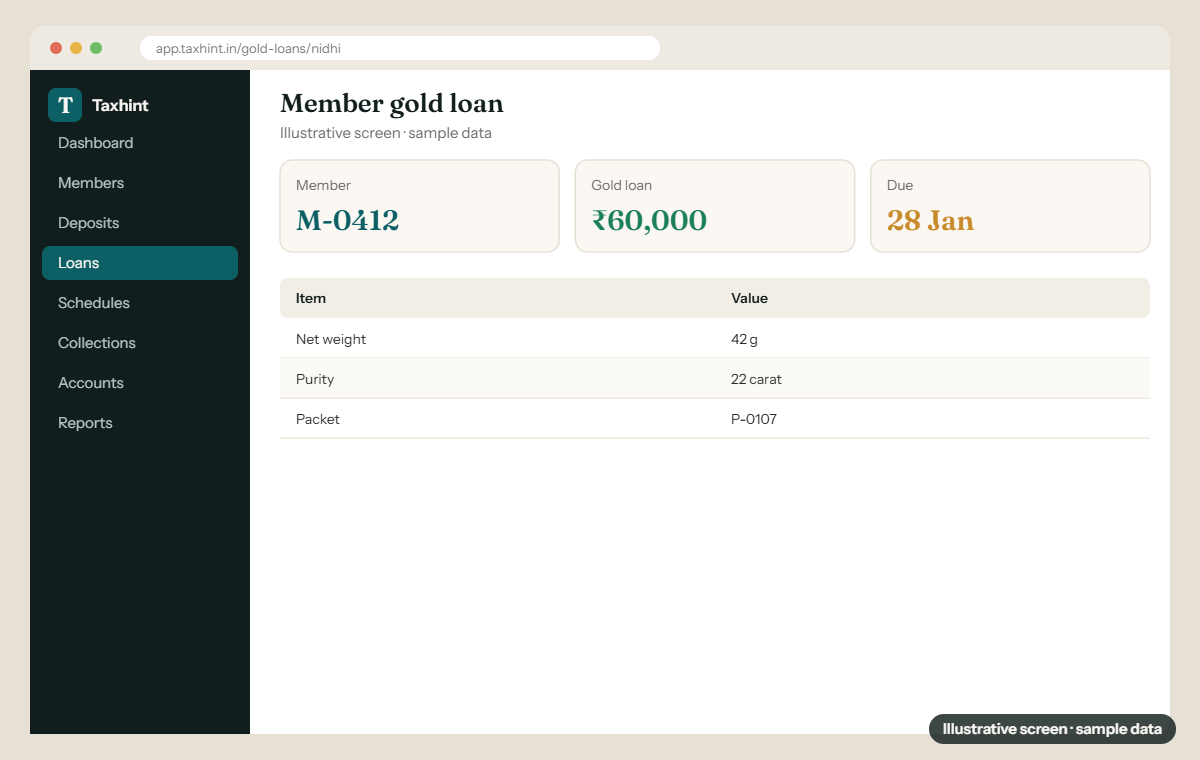
Ornament and valuation record
This is the security record.
- Item list, gross and net weight, purity and appraiser.
- Valuation and loan amount, with an approval step.
- Packet number and location.
- Scan of the signed pledge form.
See the pledge form format.
Interest, renewal and release
Daily work for the counter.
- Interest per your scheme with due amount on any date.
- Renewal and part payment.
- Release only after payment is posted.
- Receipt and release note printed from the system.
Test with the gold loan interest calculator.
Overdue and accounts
Management needs a clear picture.
- Overdue list by days.
- Posting to the ledger automatically.
- Reports of gold held and loans by branch.
See Nidhi gold loan module and Nidhi management software.
A day in the life of a Nidhi gold loan counter
A member walks in with ornaments. The cashier opens the member, sees KYC and existing loans, and starts a new gold loan. The appraiser enters items, weight and purity. The manager approves. The cashier pays, prints the receipt and seals the packet. At the end of the day the cash book, the gold register and the ledger all agree, because they came from the same entries.
Without a linked system, the same day involves a paper register, an Excel sheet, a cash book and a ledger entry made later. Each step is a chance for a mismatch.
Questions for your vendor
- Can I see the member’s deposits and other loans on the gold loan screen?
- Can I block a gold loan to a non-member?
- Does the system show gold held by branch and by age?
- Can the auditor see the gold register without being able to edit it?
- Who owns my data and can I export it?
Ask for a demo with your own sample data before you decide.
Feature checklist for the demo
| Feature | Why it matters |
|---|---|
| Member link | Shows total exposure and blocks non-members |
| Ornament and packet record | Security proof and tracking |
| Scheme-wise interest | Same numbers for every loan |
| Renewal and part release | Daily counter work |
| Overdue ageing | Follow-up list |
| Audit trail | Controls and audit |
| Ledger posting | No double entry |
Tick each feature during the demo. Ask the vendor to show it on screen, not on a slide.
A day in the life with software
In the morning the branch opens with a list of loans due today and loans overdue. During the day, each new pledge is entered with weight, purity, valuation and photograph, and a receipt is printed. In the evening the manager closes the day, matches cash and checks the gold register against the system.
Illustrative example: a branch with 40 active loans and 6 new pledges a day spends most of its time on entry and receipts. Software that fills the schedule and interest automatically saves the most time.
What to test in a demo
- Entering a pledge with multiple ornaments and one photograph.
- Part release and a top up on the same pledge.
- Interest on a loan that is renewed twice.
- Overdue list by days late.
- Day closing and gold register report.
Rollout steps
- Enter active loans with pledge details.
- Run the old register in parallel for a week.
- Count packets against the system.
- Train two people per branch.
- Retire the paper register after sign off.
FAQs
Can a Nidhi company give gold loans?
Within the Nidhi Rules. Please verify the current rules with your CA or CS.
Why link gold loans to the member record?
To see total exposure and avoid mismatches.
Does the software post to the ledger?
Good software posts loan, interest and receipts automatically.
Can I try it?
Yes. Book a demo.
Book a demo of Taxhint Nidhi software with the gold loan module. Talk to Taxhint on +91 93117 95484 or [email protected], or visit taxhint.in.