November 24, 2026 · Guides
Year-End Closing in Nidhi Software: A Practical Checklist
Year-end is when a Nidhi finds out how clean its records really are. With software, closing the year is a sequence of checks rather than a scramble. Use this checklist to close in a calm order. Accounting and compliance requirements are specific to your company, so please confirm the steps and due dates with your CA or CS.
In this guide
- 1. Before you start
- 2. Interest posting
- 3. Loans and provisions
- 4. Reconciliations
- 5. Trial balance and statements
- 6. Lock the year
- 7. Audit and filings
- 8. Opening the new year
- FAQs
1. Before you start
- Make sure all branches have entered all transactions up to the last day
- Clear or explain every suspense and pending entry
- Take a backup of the data before closing steps begin
2. Interest posting
Post interest on every deposit up to the year-end date, including FDs and RDs that continue into the next year. Compare the total interest expense with the sum of member-wise interest.
3. Loans and provisions
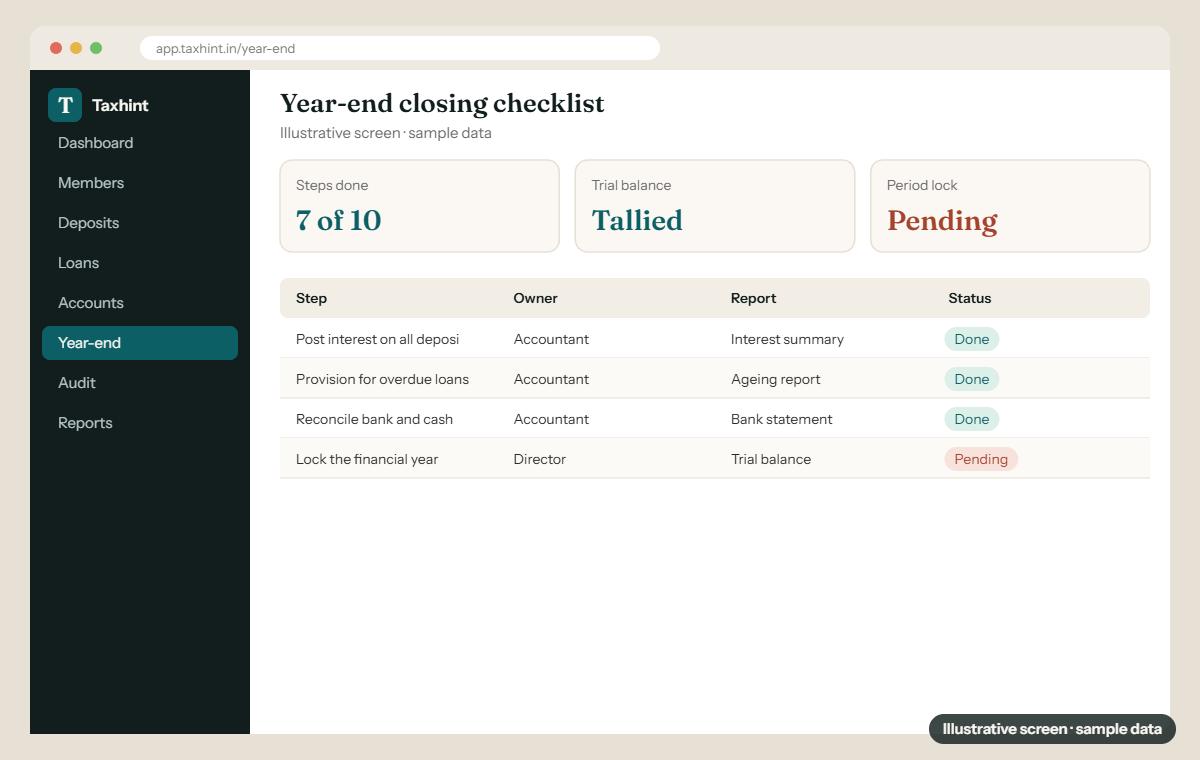
- Interest accrued on loans up to the year-end date
- Overdue ageing as at year end
- Provision for doubtful loans as per your policy and the guidance of your auditor
- Write-offs only with proper approval and records
4. Reconciliations
- Cash in hand against physical count
- Bank balances against bank statements
- Member ledgers against the control accounts in the ledger
- Agent collections against cash received
5. Trial balance and statements
Run the trial balance, and then the profit and loss and the balance sheet. Do not change a figure in the report: if something is wrong, fix the entry that caused it, with a reversal and a note.
6. Lock the year
Once the books are agreed, lock the financial year so that no one can post entries in it. Corrections after the lock should go through an approval, with a record of why.
7. Audit and filings
- Member-wise deposit and loan listings for the auditor
- Ageing and provision workings
- Reports that your CA needs for the year’s returns
- A list of changes made after the draft, with reasons
Due dates and forms change, so please confirm them with your CA or CS.
8. Opening the new year
Carry forward balances automatically, check the opening trial balance against the closing one, and reset yearly counters such as TDS interest totals. See our guide on Form 15G/15H tracking. This is part of our Nidhi management software. Read the Excel mistakes guide too, and see fintech software.
FAQs
How long does year-end closing take with software?
It depends on how clean your data is during the year. Daily reconciliation makes year-end much shorter.
Can we lock the year in the software?
Yes. Locking stops new entries in the closed period, and corrections go through approval.
What should we give the auditor?
Member-wise listings, ageing and provision workings, reconciliations and the trial balance, plus a list of post-draft changes.
Who decides the loan provision?
Your policy, guided by your auditor and the applicable rules. Please confirm the approach with your CA.
What if a branch enters late transactions?
Set a cut-off date and lock entries by branch, so late entries need approval.
Does the software carry balances forward?
Yes. Closing balances become opening balances of the new year, and you should check that the opening trial balance matches.
Want a smoother year-end for your Nidhi? Talk to Taxhint on +91 93117 95484 or [email protected], or visit taxhint.in.