November 24, 2026 · Guides
Loan Against FD in Nidhi Software: How the Module Works
A loan against FD is the safest loan a Nidhi can give, because the member’s own deposit backs it. It is also easy to get wrong in a spreadsheet: the FD matures, the lien is forgotten, or the loan outgrows the deposit. Good software handles this as a linked pair. Nidhi rules on loans are specific, so please verify the current limits with your CA or CS.
In this guide
- Marking a lien on the FD
- Loan limit and rate
- Repayment
- When the FD matures before the loan
- Default and adjustment
- What to test in a demo
- FAQs
Marking a lien on the FD
When the loan is sanctioned, the FD should be locked automatically. It cannot be closed or withdrawn until the loan is cleared or the lien is released by an authorised user.
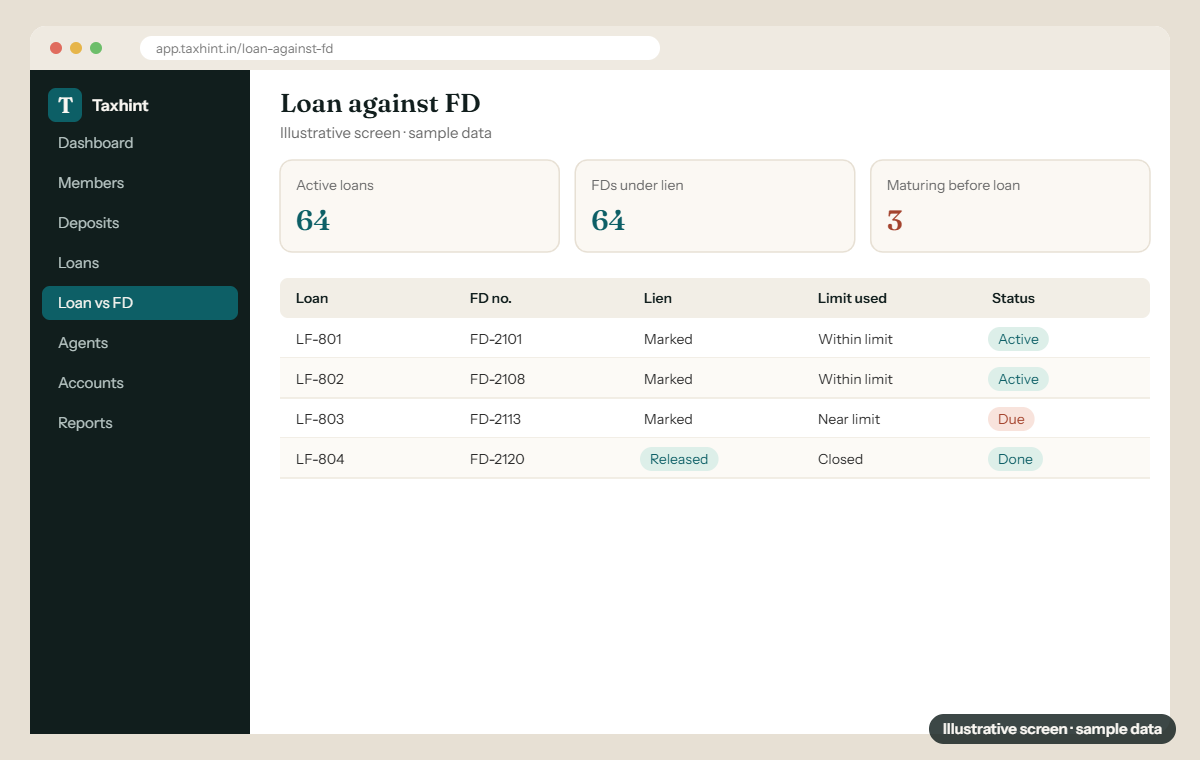
- Lien marked at sanction, with the loan number on the FD
- Premature closure blocked while the lien is active
- Release only on loan closure or authorised adjustment
- History of who marked and released the lien
Loan limit and rate
The loan amount is usually a percentage of the FD value, and the rate is set above the FD rate by your policy. Both should be settings in the software, not numbers typed per loan. Limits that apply to Nidhi companies come from the rules, so please verify them and set your own policy within them.
- Maximum percentage of FD value as a setting
- Loan rate linked to the FD rate plus your spread
- Warning when a top-up would cross the limit
- Different settings per scheme if you need them
Repayment
- Interest-only, EMI or bullet repayment as per product
- Part payment and top-up with recalculation
- Interest posted daily or monthly as your product requires
- Receipt posted to the loan and cash book together
Check sample figures with the loan EMI calculator.
When the FD matures before the loan
This is the case that causes most disputes. The software should alert you before the FD matures and let you choose: renew the FD with lien, adjust the loan from the FD, or ask the member to repay. Whatever you choose should be recorded with the date and the user.
Default and adjustment
If the member does not repay, the loan can be adjusted from the FD as per your agreement. The software should post the adjustment, show the balance and close both accounts cleanly. Please have the agreement wording checked by your advisor.
What to test in a demo
- Sanction a loan against a sample FD and see the lien appear.
- Try to close the FD prematurely and watch it get blocked.
- Make a top-up that crosses the limit and see the warning.
- Let the FD mature with the loan open and see the alert and options.
- Adjust the loan from the FD and check both ledgers.
This module is part of our Nidhi management software. Related guides: Nidhi software for a new company and the FD interest calculator. More products on fintech software.
FAQs
What is a loan against FD in a Nidhi?
A loan to a member secured by the member’s own fixed deposit with the Nidhi, with a lien marked on the FD until the loan is cleared.
Can the member close the FD while the loan is open?
Not if a lien is active. The software should block closure until the loan is cleared or the lien is released.
How much can be lent against an FD?
It depends on the Nidhi rules and your own policy. Please verify current limits with your CA or CS.
What if the FD matures first?
Options are renewal with lien, adjustment of the loan from the FD or repayment by the member. The software should alert you early and record the choice.
Can loans against FD be topped up?
Yes if the limit allows it. The software should check the limit before approving a top-up.
Does the loan interest rate depend on the FD rate?
Many Nidhis set it as FD rate plus a spread. Set the rule once and let the software apply it.
Want to see loan against FD running in Nidhi software? Talk to Taxhint on +91 93117 95484 or [email protected], or visit taxhint.in.