November 23, 2026 · Guides
Centre Meeting App for Microfinance: How It Works and What to Test
A centre meeting app lets the field officer record each member’s repayment at the meeting itself, on a phone, so the entry reaches the member’s account without anyone typing it again at the branch. That one change removes most of the evening reconciliation work in a group-lending MFI. This guide explains how a meeting runs, where paper breaks down, and what to test before you pick one.
In this guide
- What happens at a centre meeting
- Where the notebook fails
- What a centre meeting app should do
- What happens after the meeting
- Fit for a Section 8 microfinance company
- How to test one in a demo
- Rolling it out to field staff
- FAQs
What happens at a centre meeting
A centre is a set of borrower groups that meet together on a fixed day, usually weekly or fortnightly. Take a Palwal livelihood programme with a centre of four groups, five members each. The field officer reaches the village, sits with the centre leader, and collects instalments from twenty women in about forty-five minutes.
Nothing about that is complicated. The trouble is what comes after. Twenty payments, some partial, some in advance, one member absent whose neighbour paid on her behalf. All of it has to end up against the right member by the next morning.
Where the notebook fails
Most small lenders start with a collection register and a calculator, and that is fine for the first two or three centres. Problems show up with growth.
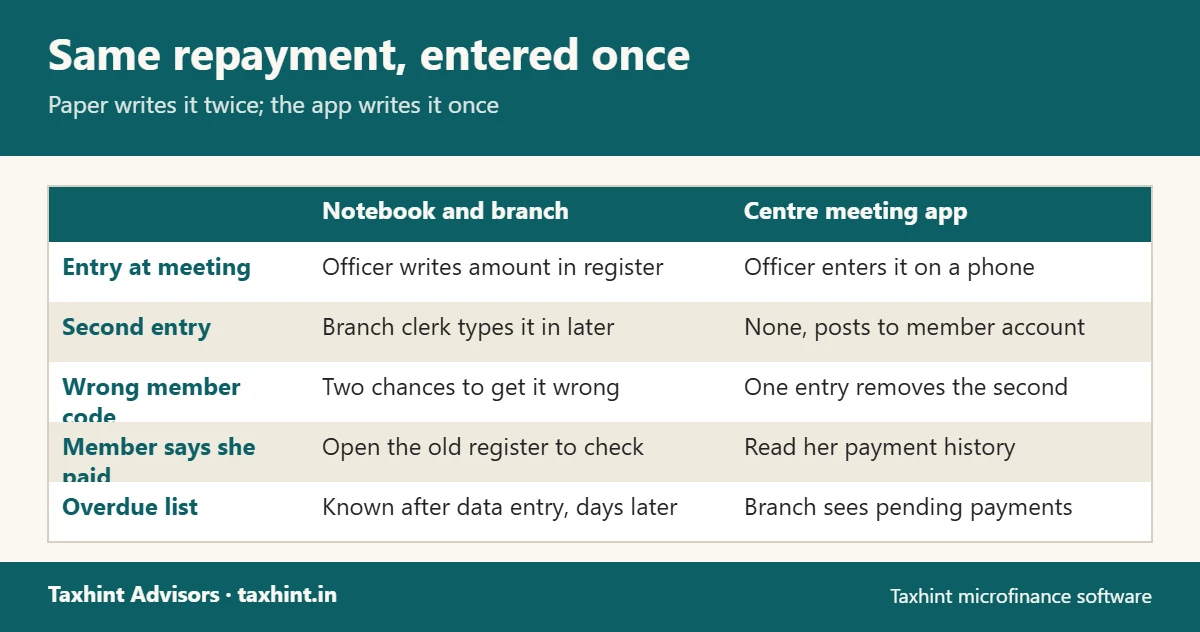
- The officer writes the amounts at the meeting and the branch clerk types them in later. Two handwriting readings, two chances for a wrong member code.
- The cash total in the bag is checked against the register, but not against each member’s balance.
- If a member says she paid last week, nobody can say so with certainty until someone opens the old register.
- The branch manager learns who is overdue only after the data entry is done, which can be days after the meeting.
None of this is fraud. It is just the cost of entering one payment twice. A good microfinance software setup removes the second entry.
What a centre meeting app should do
Before looking at any product, write down the jobs the app has to do at the meeting. Ours, for a typical JLG lender, are these.
Show the centre and its dues
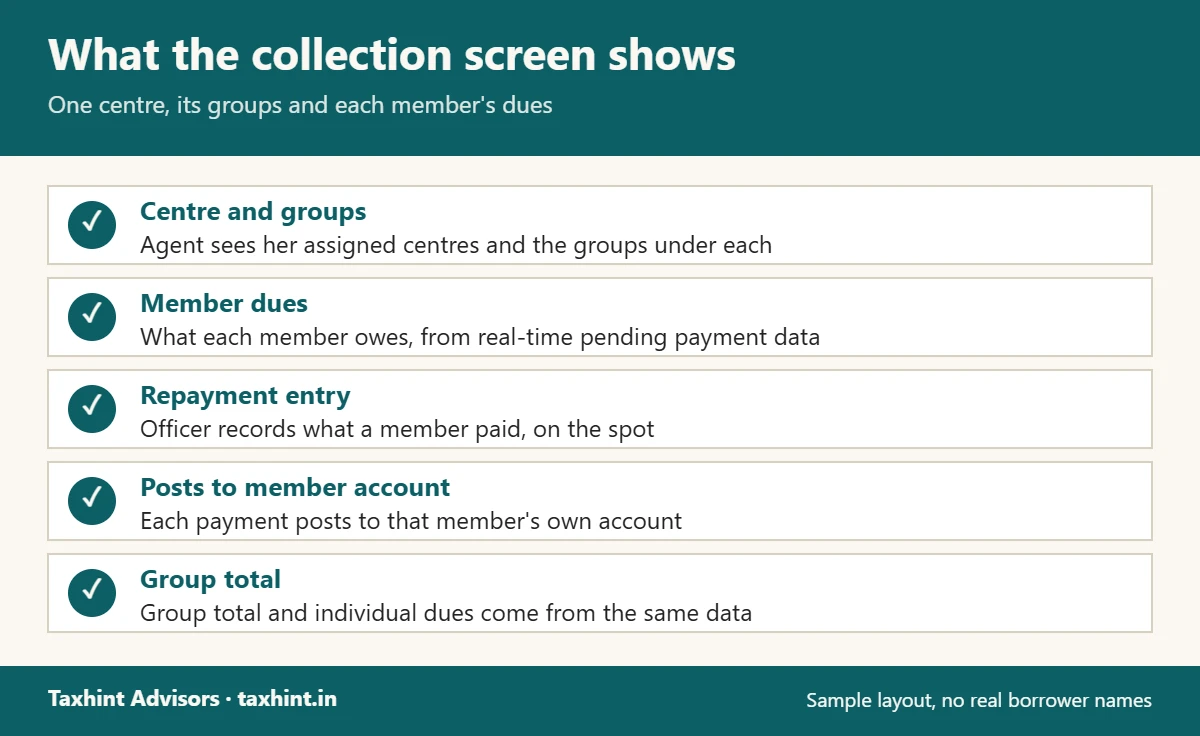
The agent logs in and sees the centres assigned to her, the groups under each, and what each member owes. In Taxhint’s platform, agents see real-time data on pending payments, so the officer does not carry a printed sheet that went stale yesterday.
Record the repayment on the spot
The Collection App is where the officer enters what a member paid. The payment posts to that member’s own account. The group total and the individual dues come from the same data, so the centre leader can be told the position before the officer leaves.
Attach location where you want it
Geo-tagging can attach the location to an entry. Some promoters want that as a check that the meeting really happened in the village. Others do not. It is a setting you decide with your operations head, not something to force on everyone.
Tell the borrower
SMS notifications go out to borrowers, so borrowers hear from the system and not only from the officer.
What happens after the meeting
The app is only half the job. What matters is what the branch sees once the officer has left the village.
- Branch manager: sees collections and pending payments for her own branch, without waiting for data entry.
- Head office: sees all branches together, through dashboards and business reports.
- Accounts: each branch keeps its own accounts and reports, so cash collected maps to the branch that collected it.
- Audit: user activity logs record what each user did, which helps when an entry has to be traced back.
Access is set by role. Admin, branch, employee and agent have separate logins, and logins can be restricted to specific IP addresses where you need that. A field agent should see her centres and nothing else.
For the wider workflow around receipts and day-end cash, see our note on the microfinance collection app.
Fit for a Section 8 microfinance company
A Section 8 microfinance company gives only collateral-free loans to households with annual income up to ₹3,00,000, takes no public deposits and stays below ₹100 crore in assets if it wants to remain exempt from RBI registration. Group lending through centres is how most such lenders work in practice.
That means the meeting app has to sit inside a system built around loans, groups and collections, with the deposit modules switched off. We have written about that setup in our guide to software for a Section 8 microfinance company.
How to test a centre meeting app in a demo
Do not accept a slide presentation. Ask the vendor to run one full centre meeting on a test login, using your own cases with the names removed. We usually advise bringing these five.
- A member who pays her full instalment.
- A member who pays part of it.
- A member who is absent, with another member paying for her.
- A member who pays two instalments in advance.
- A group where one member has gone overdue and the others are current.
Watch three things. How many taps does one repayment take on a phone? Does the entry appear in the branch view straight away? Can you open one member’s account and read her payment history without help from the vendor?
Ask also to see the agent’s login and the branch manager’s login side by side. If the app cannot restrict what each role sees, say so in your notes.
Rolling it out to field staff
In our experience, the collection app decides whether a rollout works. If field officers find it slow, they go back to the notebook, and the branch ends up entering everything twice. That is worse than no software at all.
So train agents separately from branch staff. Start with one or two centres, run them for a couple of cycles, and only then move the rest. Staff learn faster that way, and mistakes in the early data stay small.
Moving old data in comes first. Existing borrowers, groups and loan balances are moved in from Excel or your old system and reconciled against your current records before anyone relies on them. Most deployments go live in two to four weeks, depending on branches, records and print formats.
FAQs
What is a centre meeting app?
It is a mobile app that field officers use at centre meetings to see dues and record repayments. In Taxhint’s platform this is the Collection App, and each repayment posts to the member’s own account.
Does the app record payments for each member separately?
Yes. The agent records the repayment and it posts to that member’s account. Group totals and individual dues come from the same data.
Can head office see collections from all branches?
Yes. Branches keep their own accounts and reports, and head office gets a combined view through multi-tier access, dashboards and business reports.
Do borrowers get a message after paying?
SMS notifications go out to borrowers. The platform also has a Member App where borrowers can check loan status and repayment history.
Can we limit what a field agent can see?
Yes. Admin, branch, employee and agent have separate logins, with rights set per role.
Is a centre meeting app useful for a Section 8 microfinance company?
Yes, since group lending is common in the sector. We leave the deposit modules off for a Section 8 company and set the software up around loans, groups and collections.
How long does it take to start using it?
Most deployments go live in two to four weeks. The time depends on how many branches you have and how many records need moving.
What does it cost?
Taxhint’s microfinance software starts at ₹15,000. The final figure depends on branches, users and modules.
See your own centre meeting on the app. Send us your centre structure and a few sample cases, and we will run the demo around them. Book a free demo: microfinance software starting ₹15,000. Call or WhatsApp +91 93117 95484, or write to [email protected].